CI/CD · fabric-cicd · part 5 of 5
Fabric-CICD in Practice - Feature Workspaces
Provisioning a workspace per feature branch with a binding deploy and git integration, making a change in it, and promoting it to prod through the existing pipelines

In the last post in the series (Groundwork) we deployed five items from a repo through dev, test and prod, without touching a workspace by hand. Nobody could develop on top of that yet. In this post each feature branch gets its own transient workspace. A pipeline creates it empty, a deploy fills it, git integration connects it to the branch, and it is deleted when the branch merges.
fabric-cicd v1.3.0
This series is pinned to fabric-cicd 1.3.0 and Fabric CLI v1.7.0.
Sample Repo
The code for this post is the post-2 tag of EvaluationContext/fabric-cicd-example, building on post-1.
Starting Point
A quick recap of where we got to in the last post.
The bar the solution has to meet:
- Cold start: deploy into empty workspaces from the repo alone
- No clicks: nothing manual beyond the initial setup
- Idempotent: the same result however many times it runs
The repo, in Azure DevOps, holds one solution, foo, deployed with fabric-cicd through the Fabric CLI (fab deploy):
├── 📁 .azure-pipelines
│    ├── 📄 variables.yml                 # service connection names
│    ├── 📄 deploy-main.yml               # main → foo-dev, on every merge
│    ├── 📄 deploy-release.yml            # release/* → foo-test → approval → foo-prod
│    └── 📁 templates
│         ├── 📄 fab-setup-steps.yml      # install fab, log in as the SPN
│         └── 📄 fab-deploy-steps.yml     # fab deploy one environment, publish the log
└── 📁 fabric
      └── 📁 foo
          ├── 📁 Sales.Lakehouse
          ├── 📁 Load Sales.DataPipeline   # runs the notebook
          ├── 📁 Load Sales.Notebook       # writes the sales table to the lakehouse
          ├── 📁 Sales.SemanticModel       # Direct Lake on the lakehouse's SQL endpoint
          ├── 📁 Sales.Report              # bound to the model by path
          ├── 📄 config.yml                # env → workspace name, item types, publish rules
          └── 📄 parameter.yml             # two rules for the model's SQL endpoint
Branches follow Microsoft's Release Flow:
| Branch | Purpose | Pipeline | Workspace |
|---|---|---|---|
main | The trunk. Feature pull requests land here, and it is always deployable | deploy-main.yml, triggered by every merge | foo-dev |
feature/* | Where work happens. Short-lived, merged to main by pull request | None yet | Transient, created for the feature branch, and destroyed after the branch is merged or deleted |
release/* | A release candidate, cut from main. Never merges back | deploy-release.yml, triggered by every push. Deploy to Test, a manual approval, then deploy to Prod | foo-test and foo-prod |
flowchart LR
    subgraph Branches
        F[feature/*]
        M[main]
        R[release/*]
    end
    subgraph Pipelines
        DM[deploy-main.yml]
        DR[deploy-release.yml]
    end
    subgraph Workspaces
        D[foo-dev]
        T[foo-test]
        P[foo-prod]
    end
    F -- "pull request" --> M
    M -- "cut release" --> R
    M -- "merge" --> DM
    DM -- "fab deploy" --> D
    R -- "push" --> DR
    DR -- "fab deploy" --> T
    DR -- "fab deploy, after approval" --> P
Azure DevOps holds:
| Stage | Pipeline | Branch | Service connection | Environment | Checks |
|---|---|---|---|---|---|
| Dev | deploy-main.yml | main, on every merge | sc-fabric-deploy-nonprod | fabric-dev | None |
| Test | deploy-release.yml | release/*, on every push | sc-fabric-deploy-nonprod | fabric-test | None |
| Prod | deploy-release.yml | release/*, after the Test stage | sc-fabric-deploy-prod | fabric-prod | Manual approval by sg-fabric-approve-prod |
Both service connections use workload identity federation, so no secret is stored.
Entra holds:
| Service principal | Security group | Tenant settings |
|---|---|---|
sp-fabric-deploy-nonprod ( sc-fabric-deploy-nonprod) | sg-fabric-deploy-nonprod | Service principals can call Fabric public APIs Service principals can create workspaces, connections, and deployment pipelines Users can synchronize workspace items with their Git repositories |
sp-fabric-deploy-prod ( sc-fabric-deploy-prod) | sg-fabric-deploy-prod | Service principals can call Fabric public APIs |
One more group, sg-fabric-approve-prod, holds the people who approve a prod deploy.
Fabric holds three workspaces on a capacity, named <solution>-<env>:
| Workspace | Environment | Workspace permissions | Git integration |
|---|---|---|---|
foo-dev | dev | sp-fabric-deploy-nonprod: Contributor | Not connected. Published by deploy-main.yml only |
foo-test | test | sp-fabric-deploy-nonprod: Contributor | Not connected. Published by deploy-release.yml only |
foo-prod | prod | sp-fabric-deploy-prod: Contributor | Not connected. Published by deploy-release.yml only |
Each workspace holds the same five items, deployed from the repo:
| Item | Reference | Bound by |
|---|---|---|
Sales Lakehouse | ||
Load Sales Notebook | Writes the sales table to the lakehouse | Auto-binding, by logical id |
Load Sales Data Pipeline | Runs the notebook | Auto-binding, by logical id |
Sales Semantic Model | Direct Lake on the lakehouse's SQL endpoint | The two parameter.yml rules |
Sales Report | Reads the semantic model | By path, resolved by folder name in the target workspace |
Feature Workspaces
A feature branch holds one scoped piece of work, and a feature workspace is the isolated environment to build and test it in, so a developer can work without affecting anyone else. Three choices sit behind this design:
- A workspace per branch. Each
feature/*branch has its own transient workspace, kept in sync with it in content through git integration and in existence: the workspace is created with the branch and torn down when the branch is merged. Work in progress stays in its workspace, and an urgent fix gets its own, so nobody has to commit half-finished work just to switch. - Branched out by a deploy. Fabric's branch out is a git sync, and a sync only rebinds what the binding matrix says auto-binds: logical ids. References stored as other ids or literals are not covered, such as the semantic model's SQL endpoint in our example repo. So the workspace is filled by a deploy instead, which lets
parameter.ymlresolve the references auto-binding doesn't. I call this a binding deploy. - Provisioned by a pipeline. No clicks and no hand-built workspaces.
provision-feature.ymlbuilds the workspace when someone queues it, and a Teardown stage indeploy-main.ymldeletes it after the merge.
Feature workspaces follow a naming convention: foo-feature-<repo slug>-<branch slug>. The name is derived from the repo and the branch, and is therefore deterministic. That makes provisioning idempotent, because a re-run finds the workspace that already exists instead of creating a second one. It also scopes the teardown: the repo slug limits it to this repo's workspaces, and the branch tells it which of those can go.
Provisioning Order
The order matters, because each step depends on the one before it:
- Create the workspace. An empty workspace on the feature capacity, with roles granted.
- Deploy into it. A binding deploy fills the workspace, and
parameter.ymlresolves the references auto-binding doesn't cover to this workspace's items. - Connect git and commit back. Connecting before the deploy would sync the branch's unresolved references into the workspace. Connecting after it lets the workspace win, and the commit writes the resolved references to the branch.
- Relate it to dev (optional). The workspace relation API needs both workspaces connected to the same repo, so it comes last. It is cosmetic: it nests the feature workspace under the dev workspace in the Fabric UI. The API is in preview, so the pipeline only warns if it refuses.
Feature Deployment
Binding Deploy
Only a deploy runs parameter.yml, which is why a feature workspace is filled by one and not by a git sync. Its rules let fabric-cicd resolve, during the deployment, the references auto-binding doesn't cover: those stored as other ids or literals, which don't exist until the deployment starts.
Prefer a regex with a capture group, anchored on the structure around the value, over a find_value of one environment's literal. For example, Sql\.Database\("([^"]+)", matches whatever host follows Sql.Database(" and replaces only the captured host, where a plain find_value of a literal will become stale during the commit back (below). The commit back writes the feature workspace's ids into the branch, and the merge carries them to main, so the literal in the file changes. A rule matching dev's value would stop matching, and fabric-cicd would still deploy green without replacing it.
A rule's replace_value takes one of two forms:
-
_ALL_: one value for every environment,featureincluded. It has to be the only key. A dynamic variable such as$items.<type>.<name>.$idor$workspace.$id, which fabric-cicd resolves against the workspace being deployed to, means one value is enough -
Per-environment keys:
dev,testandprodeach get their own value. There is none forfeature, so fabric-cicd skips the rule in a feature workspace. Add afeaturekey with the value the feature workspace should get
Commit Back
Then we connect the workspace to the branch with git integration. Both sides now have content that differs, because parameter.yml overrode values on the feature workspace. We tell Fabric to resolve the conflict by committing from the workspace to the branch.
 expression DatabaseQuery =
        let
-           database = Sql.Database("fazr2kwaq6cu7eggbo3jwhcjpa-7oaosicotrlujkdbexkllwo7ce.datawarehouse.fabric.microsoft.com", "4f4ccee2-90a5-4efe-9c1a-d5f80ad37fc8")
+           database = Sql.Database("[feature's endpoint host]", "[feature's endpoint id]")
        in
            database
Feature Environment
The feature workspace name is derived from the repo and branch names (foo-feature-<repo slug>-<branch slug>), so config.yml can't hold a literal workspace name. It is resolved at run time and passed to fabric-cicd by the pipeline. We can still set publish and unpublish behavior. Unpublish is off for feature. We shouldn't need to deploy again after provisioning, but an accidental re-run should never delete something a developer has created and not committed.
publish:
  skip:
    feature: false # the binding deploy, once, from provision-feature.yml
    dev: false
    test: false
    prod: false

unpublish:
  skip:
    feature: true  # never delete what a developer hasn't committed yet
    dev: false
    test: false
    prod: false
Variable Libraries
I'm not using variable libraries for item references. A semantic model can't consume one, which rules out the binding we need most. For the types that can, the value is an item id that doesn't exist until the deploy creates it, so a parameter.yml rule would have to write it into the library. That is an extra item doing what parameter.yml already does, and it hides the rule behind a library lookup.
Non-item values
A library is fine for values that aren't item references. fabric-cicd activates the value set whose name matches the environment it is deploying to, so a feature value set would be activated in a feature workspace without any extra work.
Setup
Four things need setting up once before the first feature workspace can be provisioned: the git connection, capacity access, the dev workspace and developer roles.
Git Connection
To let developers commit from a feature workspace to git, we need an Azure DevOps - Source control connection, which lets the workspace authenticate with the Azure DevOps repo. The service principal sp-fabric-deploy-nonprod uses it, and the connect API needs the connection's id. Log in as sp-fabric-deploy-nonprod so the SPN owns it, or make it as yourself and share it with the SPN under Manage connections and gateways:
fab mkdir "/.connections/con-fabric-git-nonprod.Connection" -P \
  connectionDetails.type=AzureDevOpsSourceControl,\
  connectionDetails.creationMethod=AzureDevOpsSourceControl.Contents,\
  connectionDetails.parameters.url=https://dev.azure.com/<org>/<project>/_git/<repo>,\
  credentialDetails.type=ServicePrincipal,\
  credentialDetails.tenantId=<tenant id>,\
  credentialDetails.servicePrincipalClientId=<sp-fabric-deploy-nonprod client id>,\
  credentialDetails.servicePrincipalSecret=$GIT_SPN_SECRET
Client secret required
This is the first secret in the series. Workload identity federation covers the pipeline login, but a Fabric connection stores a credential, and for Azure DevOps the only kind a service principal can store is a client secret. Pass it from the shell, not a file: Never store secrets in git. To rotate it, update the credential on the existing connection (Update Connection) rather than deleting and recreating it. A new connection gets a new id, and every feature workspace the SPN has connected holds the old id in its git credentials.
connId=$(fab api connections | jq -r \
  '.text.value[] | select(.displayName=="con-fabric-git-nonprod") | .id')

fab api -X patch "connections/$connId" -i "{
  \"connectivityType\": \"ShareableCloud\",
  \"credentialDetails\": {
    \"credentials\": {
      \"credentialType\": \"ServicePrincipal\",
      \"tenantId\": \"<tenant id>\",
      \"servicePrincipalClientId\": \"<sp-fabric-deploy-nonprod client id>\",
      \"servicePrincipalSecret\": \"$GIT_SPN_SECRET\"
    }
  }
}"
Fabric runs its git operations as that credential, so the SPN also needs Basic access in the Azure DevOps organisation and Contribute on the repo. During provisioning it commits to the feature branch while setting up git integration, but only if the deploy and the parameter.yml rules rewrote files.
Capacity
Creating a workspace on a capacity needs Contributor permissions on it. In the admin portal, Capacity settings the capacity Contributor permissions, add sg-fabric-deploy-nonprod. The capacity's display name goes in variables.yml as featureCapacity.
Dev
Connect foo-dev to main, Git folder fabric/foo, from the workspace's Source control panel. This does one thing. The workspace relation is what groups feature workspaces under their source workspace in the Fabric UI, and its API refuses workspaces that aren't connected to the same repo root. It is purely cosmetic. The pipeline is still the only thing that publishes dev.
Never sync dev
After the first merge, main holds a feature workspace's ids in expressions.tmdl and the notebook. Only a deploy rewrites them on the way in. Update dev from git and the model and notebook point at a workspace that has been torn down. So never sync.
Roles
sp-fabric-deploy-nonprod will create the workspace, and therefore will have Admin permissions on it. For developers to work in the workspace, they need Contributor permissions. Add Developers to a security group sg-fabric-developers, so they can be granted Contributor on a feature workspace, as part of the provision process. That is enough to work in the workspace. Committing from it to the branch needs a little more.
[
  {
    "principal": "sg-fabric-developers",
    "id": "<object id>",
    "role": "contributor"
  }
]
Developers only ever commit from the workspace to the branch. They never update the workspace from git, so commit is the only git operation they need. On top of Contributor, that takes:
- Tenant setting: add
sg-fabric-developersto Users can synchronize workspace items with their Git repositories in the tenant settings. - Azure DevOps: Read and Contribute on the repo, and any branch policy must allow direct commits to
feature/*. Git credentials are per user, and for Azure DevOps Fabric sets up a developer's from their own sign-in, so their own account needs the access
Switching branches
The workspace setting Allow users with at least Contributor role to change Git branch is not needed. Nobody switches a feature workspace to another branch.
Provision Pipeline
provision-feature.yml runs the steps from Provisioning Order. Branch feature/<branch-name> in the repo fabric-cicd becomes foo-feature-fabric-cicd-<branch-slug>.
The pipeline has no trigger and is run manually against a specific branch: Run pipeline, pick the branch under Branch/tag, run. This is deliberate. Not every branch needs a workspace, a docs-only change doesn't, and a CI trigger would spin up an agent for no reason. A push trigger would also run the binding deploy over the workspace on every push, publishing the branch over whatever is uncommitted in it. The dialog defaults to main, so the first step refuses anything that isn't feature/*.
 ├── 📁 .azure-pipelines
+│    ├── 📄 provision-feature.yml           # run by hand on a feature branch, builds its workspace
+│    ├── 📄 feature-workspace-roles.json    # who gets which role on a feature workspace
 │    ├── 📄 variables.yml                   # gains the feature capacity and git connection names
 │    ├── 📄 deploy-main.yml                 # gains a Teardown stage that deletes merged branches' workspaces
 │    ├── 📄 deploy-release.yml
 │    └── 📁 templates
 │         ├── 📄 fab-setup-steps.yml
 │         └── 📄 fab-deploy-steps.yml       # gains an optional config override, for the feature workspace name
The steps from Provisioning Order, one script each:
trigger: none
pr: none

variables:
  - template: variables.yml

jobs:
  - job: ProvisionFeature
    displayName: Provision feature workspace
    pool:
      vmImage: ubuntu-latest
    steps:
      # The Run dialog defaults to main. Refuse anything but feature/*, and
      # derive the workspace name: feature/average-amount in repo fabric-cicd
      # → foo-feature-fabric-cicd-average-amount
      - script: |
          set -euo pipefail
          case "$BUILD_SOURCEBRANCH" in
            refs/heads/feature/*) ;;
            *)
              echo "##vso[task.logissue type=error]provision-feature runs on feature/* only. Run pipeline, pick the branch under Branch/tag."
              exit 1 ;;
          esac
          branch="${BUILD_SOURCEBRANCH#refs/heads/}"
          slug() { printf '%s' "$1" | tr 'A-Z' 'a-z' | tr -cs 'a-z0-9' '-' | sed 's/^-//; s/-$//'; }
          repoSlug=$(slug "$BUILD_REPOSITORY_NAME")
          branchSlug=$(slug "${branch#feature/}")
          echo "##vso[task.setvariable variable=branch]$branch"
          echo "##vso[task.setvariable variable=workspace]foo-feature-$repoSlug-$branchSlug"
        displayName: Guard feature/* and name the workspace

      - checkout: self

      - template: templates/fab-setup-steps.yml
        parameters:
          serviceConnection: ${{ variables.serviceConnectionDev }}

      # 1. Create: an empty workspace on the capacity, roles from a file
      - script: |
          set -euo pipefail
          ws="$(workspace)"
          if wsId=$(fab get "/$ws.Workspace" -q id 2>/dev/null | tr -cd '0-9a-fA-F-'); then
            echo "exists:  $ws ($wsId)"
          else
            fab mkdir "/$ws.Workspace" -P capacityName="$(featureCapacity)"
            wsId=$(fab get "/$ws.Workspace" -q id | tr -cd '0-9a-fA-F-')
            echo "created: $ws ($wsId)"
          fi
          echo "##vso[task.setvariable variable=workspaceId]$wsId"

          # The humans. The SPN is already Admin: it created the workspace.
          jq -c '.[]' .azure-pipelines/feature-workspace-roles.json |
          while read -r assignment; do
            fab acl set "/$ws.Workspace" \
              -I "$(jq -r '.id' <<<"$assignment")" \
              -R "$(jq -r '.role' <<<"$assignment")" -f
          done
        displayName: Create workspace and grant roles

      # 2. Fill: the binding deploy. config.yml names no feature workspace;
      #    the derived name rides in as a config override for this run only.
      - template: templates/fab-deploy-steps.yml
        parameters:
          targetEnv: feature
          configOverride: '{"core":{"workspace":{"feature":"$(workspace)"}}}'

      # 3. Connect: git integration to the branch, workspace side wins, commit
      - script: |
          set -euo pipefail
          ws="$(workspace)"; wsId="$(workspaceId)"; branch="$(branch)"
          org="$(basename "${SYSTEM_COLLECTIONURI%/}")"

          # The SPN's git credential lives in a Fabric connection, by name.
          connId=$(fab api connections | jq -r \
            ".text.value[] | select(.displayName==\"$(gitConnection)\") | .id")
          [ -n "$connId" ] || { echo "##vso[task.logissue type=error]git connection '$(gitConnection)' not found or not shared with the SPN"; exit 1; }

          # A re-run finds the workspace already connected, so connect only when it is not.
          state=$(fab api "workspaces/$wsId/git/connection" | jq -r '.text.gitConnectionState')
          if [ "$state" = "NotConnected" ]; then
            fab api -X post "workspaces/$wsId/git/connect" -i "{
              \"gitProviderDetails\": {
                \"gitProviderType\": \"AzureDevOps\",
                \"organizationName\": \"$org\",
                \"projectName\": \"$SYSTEM_TEAMPROJECT\",
                \"repositoryName\": \"$BUILD_REPOSITORY_NAME\",
                \"branchName\": \"$branch\",
                \"directoryName\": \"fabric/foo\"
              },
              \"myGitCredentials\": { \"source\": \"ConfiguredConnection\", \"connectionId\": \"$connId\" }
            }"
            echo "connected: $ws → $branch (fabric/foo)"
          fi
          state=$(fab api "workspaces/$wsId/git/connection" | jq -r '.text.gitConnectionState')
          [ "$state" != "NotConnected" ] || { echo "##vso[task.logissue type=error]could not connect $ws to $branch"; exit 1; }
          [ "$state" != "ConnectedAndInitialized" ] || { echo "initialized: $ws is already in sync, nothing to commit"; exit 0; }

          # Both sides have content. The deploy just published the branch into
          # the workspace, so the workspace wins and Fabric asks for a commit.
          action=$(fab api -X post "workspaces/$wsId/git/initializeConnection" \
            -i '{"initializationStrategy": "PreferWorkspace"}' | jq -r '.text.requiredAction')
          case "$action" in
            CommitToGit) ;;
            None) echo "initialized: nothing to commit"; exit 0 ;;
            *)
              echo "##vso[task.logissue type=error]initialize asked for '$action': the branch holds something the deploy did not publish. Every item folder under fabric/foo must be in item_types_in_scope."
              exit 1 ;;
          esac

          # The commit: the workspace's ids over the branch's. workspaceHead
          # comes from the status API, and is absent before the first sync.
          body=$(fab api "workspaces/$wsId/git/status" | jq -c \
            '{mode: "All", comment: "Binding deploy: '"$ws"' [skip ci]"}
             + (if .text.workspaceHead then {workspaceHead: .text.workspaceHead} else {} end)')
          fab api -X post "workspaces/$wsId/git/commitToGit" -i "$body"

          # Read-back: the commit is async, poll until the workspace head is the
          # branch head.
          for i in $(seq 1 30); do
            status=$(fab api "workspaces/$wsId/git/status")
            head=$(jq -r '.text.workspaceHead' <<<"$status")
            remote=$(jq -r '.text.remoteCommitHash' <<<"$status")
            if [ "$head" != "null" ] && [ "$head" = "$remote" ]; then
              echo "committed: $branch at $head"; exit 0
            fi
            sleep 10
          done
          echo "##vso[task.logissue type=error]commit never landed on $branch"
          exit 1
        displayName: Connect to git and commit

      # 4. Relate: to dev, for the Fabric UI only. Preview API, warn on refusal.
      - script: |
          set -euo pipefail
          wsId="$(workspaceId)"
          dev=$(python -c "import yaml; print(yaml.safe_load(open('fabric/foo/config.yml'))['core']['workspace']['dev'])")
          # Keep only the GUID: fab output can carry a stray control character, which
          # is invalid inside the JSON body below.
          devId=$(fab get "/$dev.Workspace" -q id | tr -cd '0-9a-fA-F-')
          if fab api -X post "workspaces/$wsId/git/workspaceRelations" \
               -i "{\"relatedWorkspaceId\": \"$devId\", \"relationType\": \"Base\"}"; then
            echo "related: $(workspace) → $dev"
          else
            echo "##vso[task.logissue type=warning]could not relate $(workspace) to $dev; the workspace works without it, the UI just won't list it under dev"
          fi
        displayName: Relate to dev
 parameters:
   - name: targetEnv
-    displayName: Target environment key in config.yml (dev / test / prod)
+    displayName: Target environment key in config.yml (feature / dev / test / prod)
     type: string

   - name: configFile
     displayName: Path to the fabric-cicd config.yml
     type: string
     default: fabric/foo/config.yml

+  - name: configOverride
+    displayName: JSON merged over config.yml for this run (empty for none)
+    type: string
+    default: ''
+
 steps:
   - script: |
       set -euo pipefail
       config="${{ parameters.configFile }}"
       env="${{ parameters.targetEnv }}"
+      override='${{ parameters.configOverride }}'
+      args=()
+      [ -n "$override" ] && args=(-P "config_override=$override")
       ...
-      fab deploy --config "$config" --target_env "$env" --force 2>&1 | tee -a "$log"
+      fab deploy --config "$config" --target_env "$env" --force "${args[@]}" 2>&1 | tee -a "$log"
variables:
  serviceConnectionDev: sc-fabric-deploy-nonprod
  serviceConnectionProd: sc-fabric-deploy-prod

  # provision-feature.yml. The capacity feature workspaces are created on, by
  # display name. The non-prod SPN needs Contributor permissions on it.
  featureCapacity: evaluationcontext

  # provision-feature.yml. The Fabric connection holding the non-prod SPN's
  # Azure DevOps credential, by display name.
  gitConnection: con-fabric-git-nonprod
Pull before you push
The pipeline's commit is a commit on your branch, so git pull before you push again.
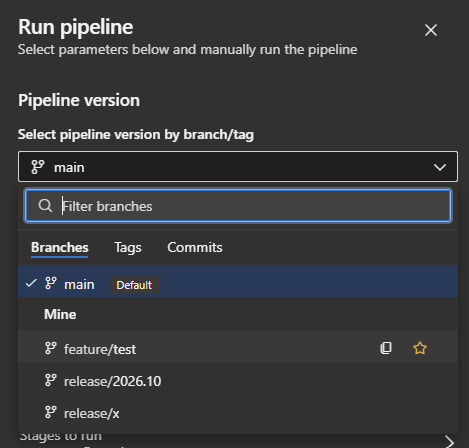
With that set up we can create a branch feature/test. It has to be pushed to Azure DevOps first, because the pipeline can only run a branch that exists on the remote, and git integration connects the workspace to that remote branch.
Then run the pipeline on it to provision a feature workspace.
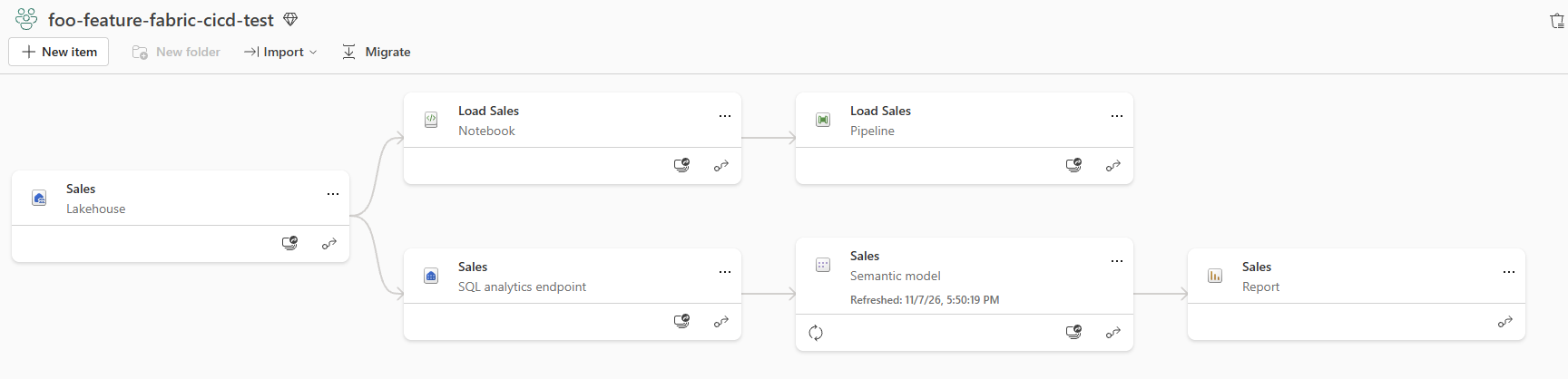
After the pipeline has finished we can check the lineage view of foo-feature-fabric-cicd-test. It shows the semantic model reading its own lakehouse (rather than Dev's), so the binding deploy worked.
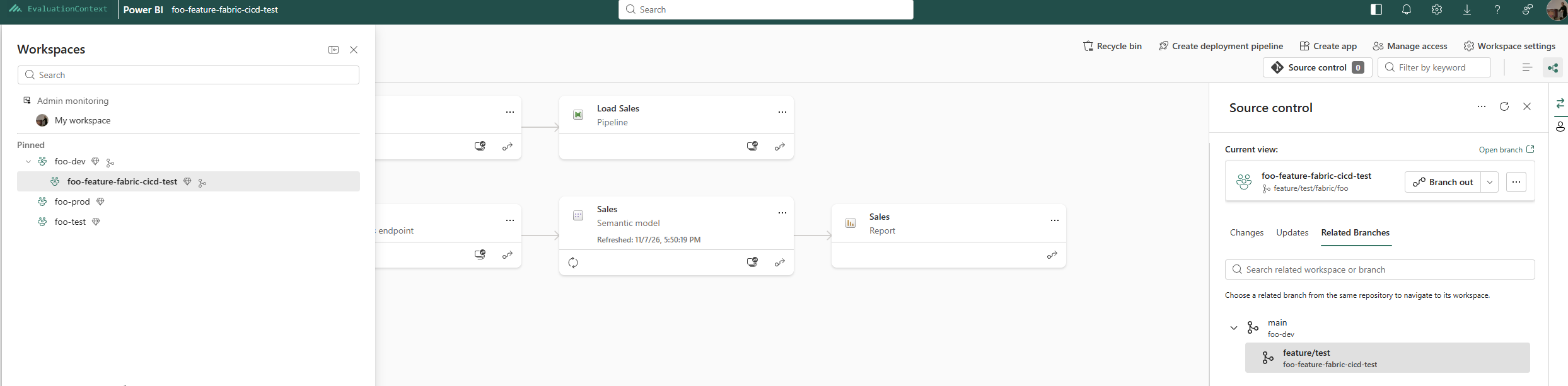
We can also see the relationship from the dev workspace's perspective, where the feature workspace is listed as a branch.
Developing
In the Workspace
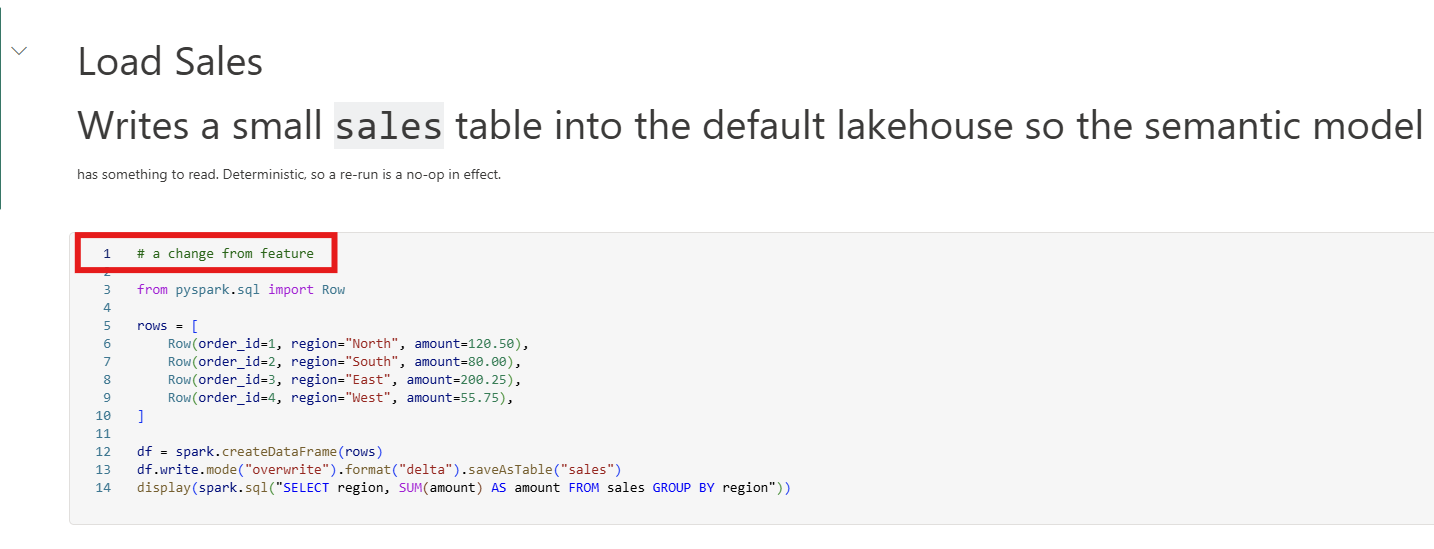
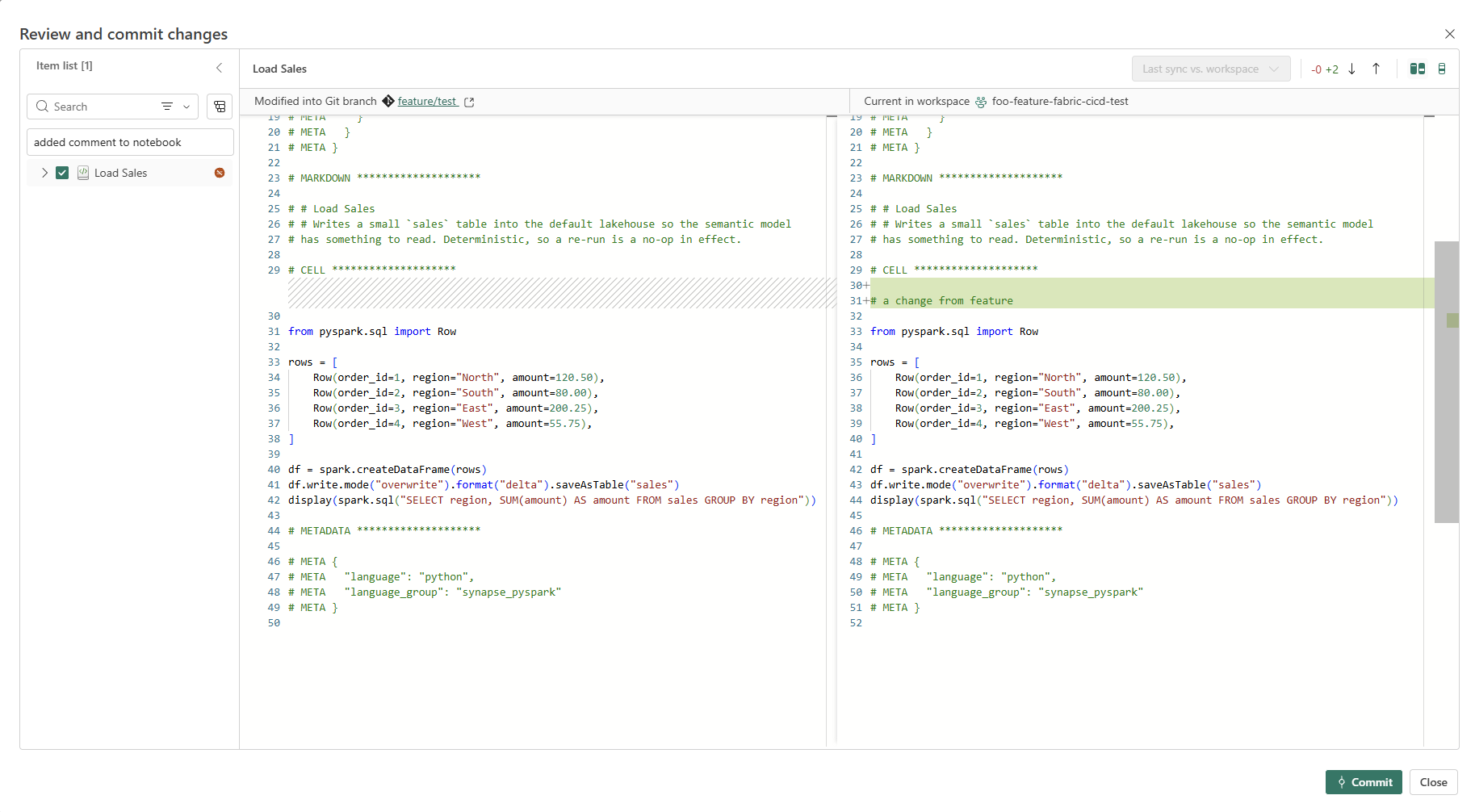
We can work in the workspace as normal. I opened the Load Sales notebook, added a comment to its cell.
 # CELL ********************

+# a change from feature
+
 from pyspark.sql import Row
The Source control panel shows the same change as an uncommitted diff, which I committed to the feature branch.
From the Repo
A definition edited in VS Code, or by an agent, needs to get from the repo into the workspace. Git integration can do that, by updating the workspace from the branch, but I don't use it, for three reasons:
- Throwaway commits: git integration only sees committed state, so testing an edit means committing it first, and committing again for every fix
- Poor errors: an update from git applies the whole branch and reports one coarse status for the workspace, rather than which item failed and why
- Agentic loops: an agent needs a fast loop of apply, read the error, fix, apply again, and a commit per iteration is neither fast nor clean. This is the discover, apply, verify pattern in Microsoft's skills-for-fabric
Instead fab import pushes one item, and a read-back proves it landed.
ws="foo-feature-fabric-cicd-test"

# apply: one item, one call
fab import -f "/$ws.Workspace/Load Sales.Notebook" -i "fabric/foo/Load Sales.Notebook" --format .py &&
  echo "PASS import Load Sales.Notebook" ||
  { echo "FAIL import Load Sales.Notebook"; exit 1; }

# verify: read it back from the workspace, not the repo
fab get "/$ws.Workspace/Load Sales.Notebook" -q "id" >/dev/null &&
  echo "PASS read-back Load Sales.Notebook" ||
  { echo "FAIL read-back Load Sales.Notebook"; exit 1; }

# a run proves it works
fab job run "/$ws.Workspace/Load Sales.Notebook"
Not a promotion mechanism
No parameter.yml is involved. The item lands exactly as authored, so an item from a branch that hasn't had its ids committed back lands with unresolved ones. This loop is for feature development only, never promotion.
Pull Request
Before submitting a Pull Request, review parameter.yml to add rules for any new item that needs a rule or an existing rule that needs changing.
The pull request in our case shows two commits: first the binding deploy's commit, and then the notebook comment.
Merge, with Delete source branch ticked, because Teardown only removes a workspace once its branch is gone. deploy-main runs its Dev stage as before. Then a new Teardown stage deletes this repo's feature workspaces whose branch is gone from the remote. If in doubt, a workspace is kept. It is deleted only if every one of these checks passes:
- Same repo: its git connection names this repo. Two repos with overlapping slugs can share a name prefix, but not a repository name
- A feature branch: it is connected to a
feature/*branch, so nothing connected tomainis ever a candidate - Provisioned for that branch: its name is exactly the one the provision pipeline derives from the repo and branch
- Branch confirmed gone:
git ls-remoteexits 2, meaning the remote answered and the branch is not there. Any other exit code is a failure to ask, so the workspace is kept with a warning
  - stage: Teardown
    displayName: Teardown feature workspaces
    dependsOn: Dev
    # Only a run on main may delete anything.
    condition: and(succeeded(), eq(variables['Build.SourceBranch'], 'refs/heads/main'))
    jobs:
      - job: TeardownFeatureWorkspaces
        displayName: Delete workspaces for merged branches
        pool:
          vmImage: ubuntu-latest
        steps:
          - checkout: self
            persistCredentials: true   # git ls-remote against the repo

          - template: templates/fab-setup-steps.yml
            parameters:
              serviceConnection: ${{ variables.serviceConnectionDev }}

          - script: |
              set -euo pipefail
              slug() { printf '%s' "$1" | tr 'A-Z' 'a-z' | tr -cs 'a-z0-9' '-' | sed 's/^-//; s/-$//'; }
              # If in doubt, keep. A workspace is deleted only when every check below
              # passes; a failed check, an odd name or a failed git call keeps it.
              repo="$BUILD_REPOSITORY_NAME"
              prefix="foo-feature-$(slug "$repo")-"

              # Delete nothing unless the remote answers and still has main, so an
              # unreachable remote can never read as "every branch is gone".
              git ls-remote --exit-code --heads origin refs/heads/main >/dev/null

              # Only workspaces the SPN holds a role on come back, which is
              # why provisioning kept it Admin. Delete is Admin-only too.
              fab api workspaces |
                jq -r --arg p "$prefix" '.text.value[]
                  | select(.displayName | startswith($p)) | [.id, .displayName] | @tsv' |
              while IFS=$'\t' read -r wsId wsName; do
                conn=$(fab api "workspaces/$wsId/git/connection" </dev/null)
                connRepo=$(jq -r '.text.gitProviderDetails.repositoryName // empty' <<<"$conn")
                branch=$(jq -r '.text.gitProviderDetails.branchName // empty' <<<"$conn")

                # Every check must pass, or the workspace is kept.
                if [ "$connRepo" != "$repo" ]; then
                  echo "keep:   $wsName (connected to '$connRepo', not $repo)"; continue
                fi
                case "$branch" in
                  feature/?*) ;;
                  *) echo "keep:   $wsName ('$branch' is not a feature branch)"; continue ;;
                esac
                if [ "$wsName" != "$prefix$(slug "${branch#feature/}")" ]; then
                  echo "keep:   $wsName (not the workspace provisioned for $branch)"; continue
                fi

                # ls-remote exits 0 when the branch exists and 2 when it does not. Any
                # other code means the check failed, which is not an answer.
                rc=0
                git ls-remote --exit-code --heads origin "refs/heads/$branch" </dev/null >/dev/null || rc=$?
                case "$rc" in
                  0) echo "keep:   $wsName ($branch still exists)" ;;
                  2) echo "delete: $wsName ($branch is gone)"
                     fab api -X delete "workspaces/$wsId" </dev/null ;;
                  *) echo "##vso[task.logissue type=warning]kept $wsName: could not check $branch (git exit $rc)" ;;
                esac
              done
            displayName: Teardown
Release
We can then cut release/2026.11 to kick off deploy-release, which deploys to foo-test and, after the manual approval, to foo-prod.
The comment from the feature branch is in the prod notebook.