VS Code extension
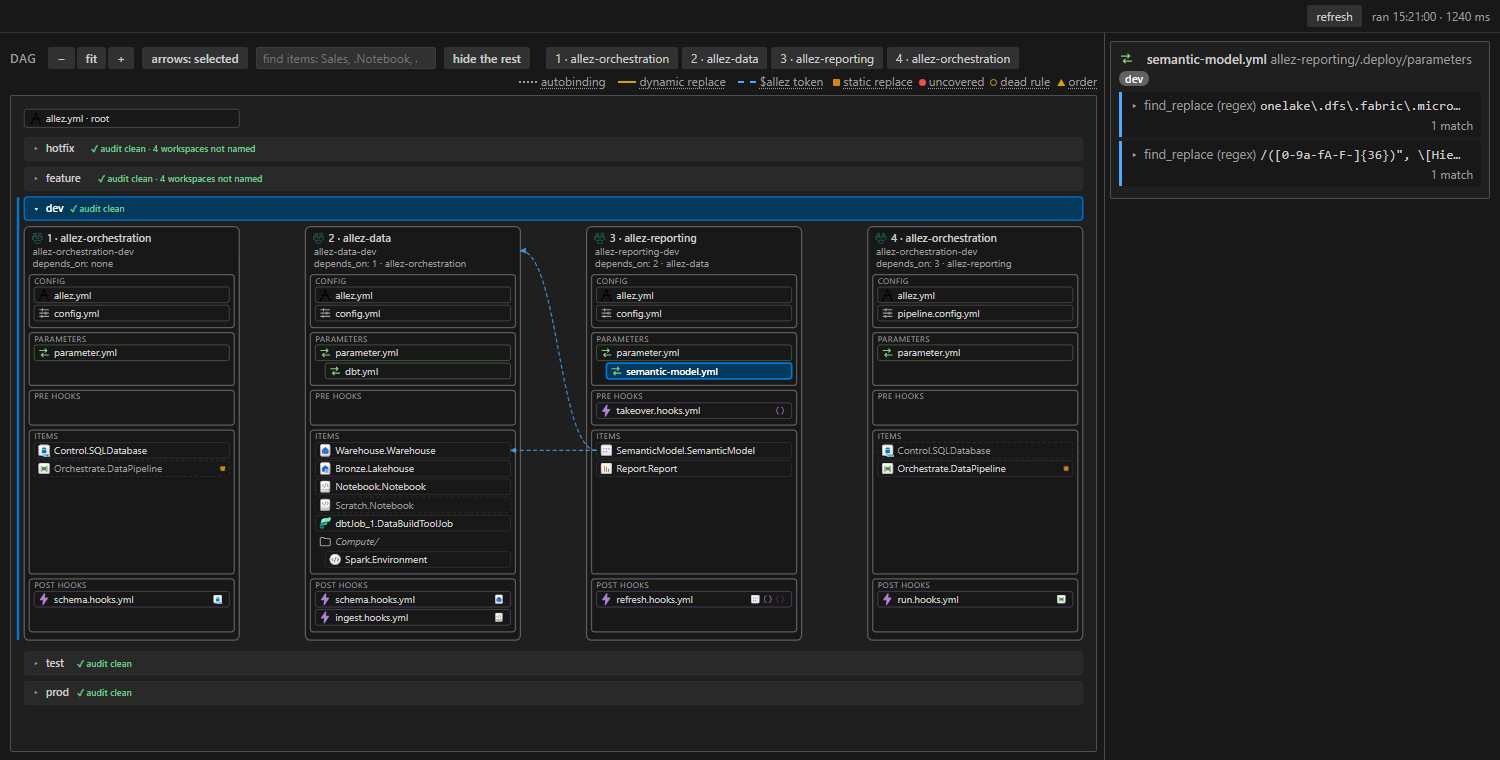
vscode-allez is a VS Code extension for a repo that uses allez. It puts the audit's findings in the Problems panel, offers quick fixes for the common ones, and draws the deployment: the dag, what each file deploys, and which ids each parameter.yml rule rewrites. Everything it shows comes from allez document, so it needs no Fabric login and never calls Fabric.
-
The audit's findings at their file and line, the three quick fixes, CodeLens above the YAML, and schema help for
allez.yml. -
The dag for every environment, what each file carries, and the id references between items.
How it works
The extension runs allez document once for each declared environment and draws what comes back. It never reads an item definition or matches a rule itself, so it shows what the CLI and the pipelines would see.
-
Repo files
allez.yml,config.yml,parameter.ymland the item folders. -
allez documentOnce per environment, when the folder opens and after each save. Offline.
-
What you see
The Problems panel and its quick fixes, CodeLens above the YAML, and the Deployment view.
A quick fix edits the YAML and saves it, so the extension runs again and the picture catches up.
Install
Requirements
- VS Code 1.90 or later.
- allez installed (Install). The extension runs it.
- Red Hat's YAML extension (
redhat.vscode-yaml). VS Code installs it with this one.
Install it from the Marketplace: search for allez in the Extensions view, or run code --install-extension evaluationcontext.vscode-allez. Its version is allez's; an allez release publishes the extension too.
When it runs
The extension starts in any folder that contains an allez.yml. It uses the allez.yml that declares environments:, which is the root file; if there are several, the one with the shortest path wins.
It runs allez document once for each declared environment when the folder opens, and again a moment after you save any file under the root. Switching environment or comparing two is then instant, because every environment's answer is already there. The refresh button runs it again, and the text beside it says when the last run finished and how long it took.
The first run after allez itself is installed or updated can take ten seconds or more while Python compiles it. Later runs on the sample take under a second each.
A first look at a project
Here is an order to work through a solution you have not seen before, or one you are setting up.
-
Open the repo root and the Allez tab in the panel area, beside Terminal. Each environment is a band with its audit verdict on the header. A solution that has never been audited usually shows blockers.
-
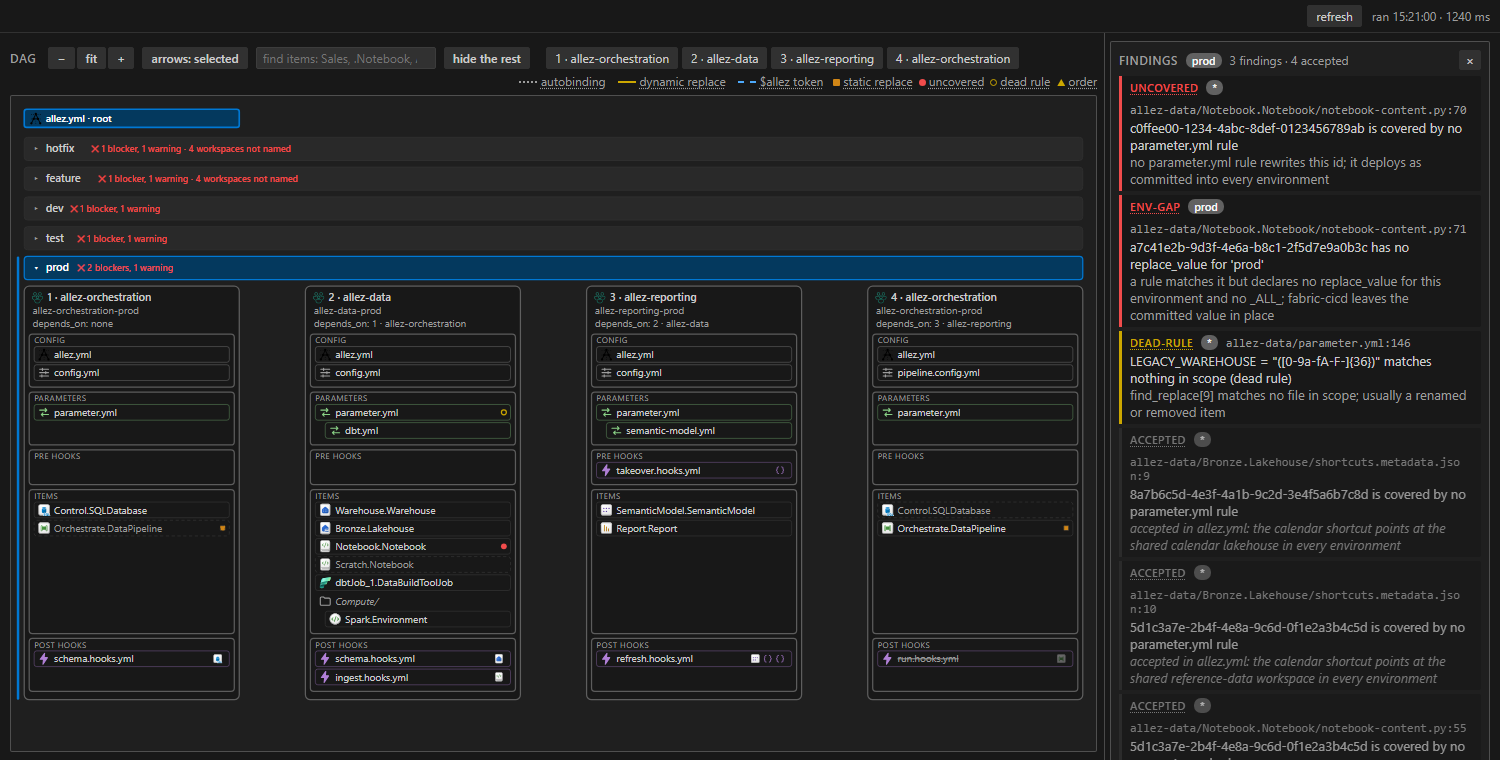
Click a band's verdict for its findings list, blockers first. Each entry opens its file at the line.
-
Work down the list.
- An
uncoveredid is a reference noparameter.ymlrule rewrites. The light bulb on it adds afind_replaceskeleton; finish it with a dynamic replacement such as$items.Warehouse.<name>.$id(Problems and quick fixes). - An
env-gapis a rule with no value for one environment. The light bulb adds the missing key. - A
dead-rulematches nothing. Fix its filters or delete it. - A finding that is the design, such as a lakehouse every environment shares, goes in the sub-folder's
allez.ymlunderaudit.accept:with a reason (Accepting a finding). It then shows greyed, as at the bottom of the list above.
- An
-
Open an item's files to see each id it holds, how it is covered for the selected environment, and the rules that rewrite it (The right column).
The same findings fail allez audit in the pipeline, so a clean band here is a clean validate run there.
Troubleshooting
| Symptom | Cause and fix |
|---|---|
Allez: Deployment says no allez.yml with environments: in this workspace |
No allez.yml in the folder declares environments:. Open the repo root, or add the key to the root file. |
The view shows allez document failed, with the last good picture underneath |
allez refused the solution. The message names the file and key, and the same error sits on the root allez.yml in Problems. Run allez document <root> in a terminal to see it in full. |
| Nothing appears, and the error says the command cannot be found | allez is not on PATH. Set allez.command to the executable. |
| The view looks the same after installing a new build | VS Code is still running the old code. Install with --force, then Developer: Reload Window. |
| A refresh takes many seconds | The first run after allez was installed or updated compiles it. If every run is slow, time allez document <root> in a terminal; the extension runs it once per environment. |